Stop Managing Clients Manually. Start Running Projects Like a System.
WorkBridge gives freelancers a structured workspace where clients review work, approve milestones, and you can track payments All In One Place.
Where work slips
Projects don’t fail all at once; they break down in the small gaps between updates, messages, and milestones.
WorkBridge is built to close those gaps: one workspace your clients can follow, with structure instead of scattered threads.
- Updates splinter across apps
- Files end up in different places
- Milestone status gets fuzzy
Endless client follow-ups
You’re chasing updates, re-explaining progress, and repeating the same answers across DMs, email, and calls.
Scattered files and feedback
Deliverables and comments live in different tools, so “final” is fuzzy and nothing feels like a single thread.
Milestone status gets fuzzy
Without a clear view per milestone, it’s hard to see what’s approved, what’s waiting, and what still needs a decision.
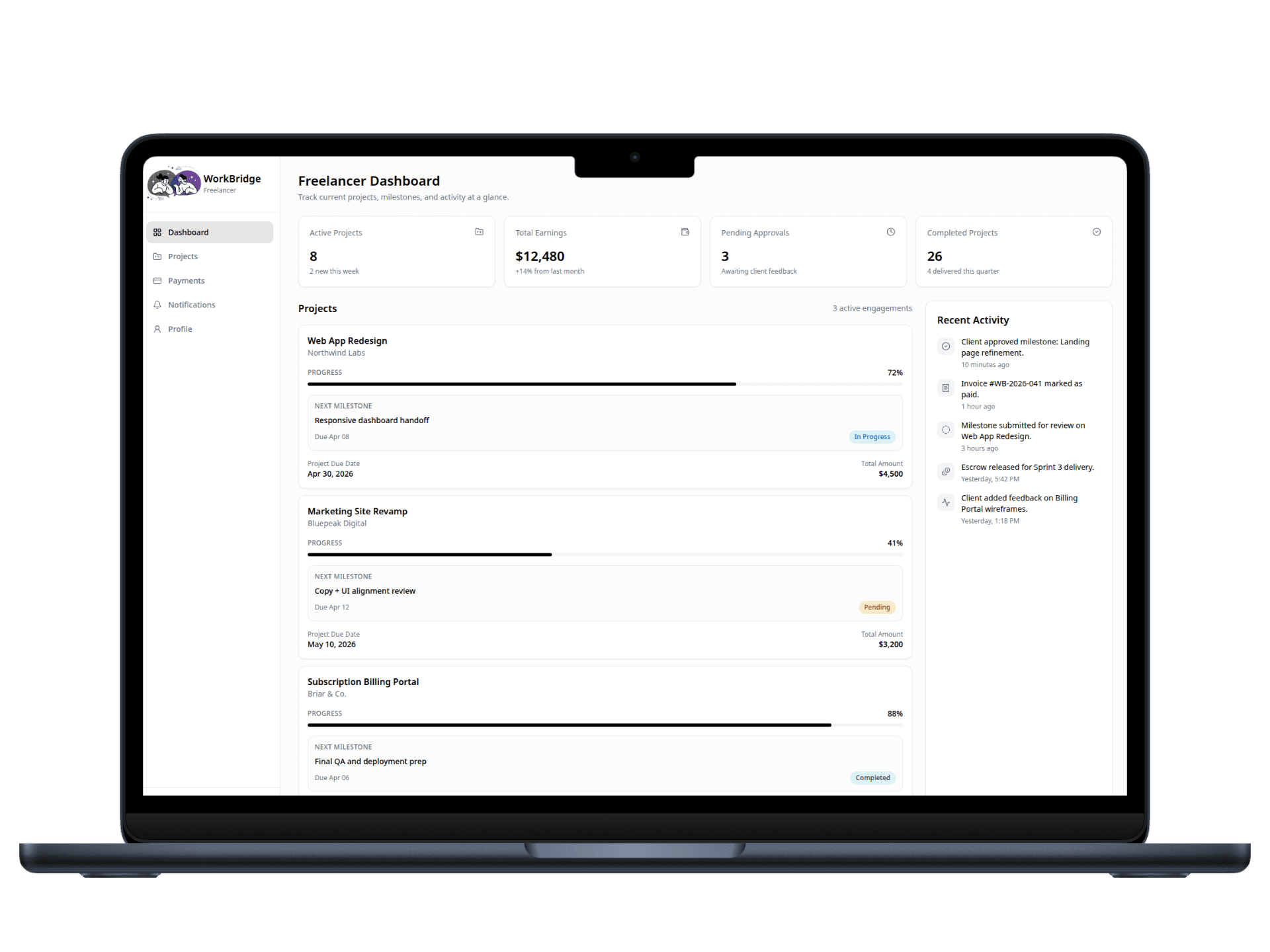
A single workspace where your entire client workflow lives.
Move from scattered communication to a structured loop: plan work, ship deliverables, get approvals, and keep milestone payment tracking visible as you go.
The WorkBridge loop
Milestones
Step 1
Deliverables
Step 2
Client approval
Step 3
Payment tracking
Step 4
Outcome: faster approvals, clearer expectations, and milestone payment status you can actually follow.
Built for real freelancer workflows.
Everything you need to run client projects with structure, without adding complexity.
Role-based dashboards
Freelancers manage everything, while clients see only what matters; progress, deliverables, and approvals.
Milestone tracking
Break projects into clear deliverables with defined scope, timelines, and approval checkpoints.
Centralized file sharing
Upload and manage all deliverables in one place with version control and easy client access.
Built-in approvals
Clients can review work, request revisions, or approve instantly; no back-and-forth confusion.
Milestone payment tracking
See milestone payment status in one view; what’s approved, pending, or paid, without juggling spreadsheets or threads.
Activity timeline
A real-time log of updates, decisions, and progress so nothing gets missed or repeated.
Bring every client into one structured workflow.
Clients come from everywhere — messages, referrals, platforms, and email. WorkBridge centralizes the workflow so you can manage projects, run approvals, share files, and track milestone payment status without scattered communication or constant follow-ups.





Client

WorkBridge
Freelancer
X
Fiverr
Upwork
Channels
Client
WorkBridge
Freelancer
How it works
A straight path from setup to delivery — milestones, collaboration, and tracking in one workspace.
- 01
Sign up as a Freelancer
Create your account and set up your profile.
- 02
Create a Project
Define the project and break it into milestones.
- 03
Add Your Client
Invite or attach the client to the project workspace.
- 04
Collaborate in One Place
Upload files, deliver work, and share updates. Your client can review, request rework, and give feedback.
- 05
Track Progress & Activity
View activity logs, notes, and project history in real time.
- 06
Monitor Milestone Payments
Track milestone approval status and payment readiness once milestones are approved.
What freelancers say
“Great for keeping track of project milestones; simple, clear, and effective.”
“I was juggling Figma comments, a Notion page, and email for the same sprint. Stupid. Now there's one link to point people at, still chaos some weeks but less.”
“Fewer duplicate uploads. That alone helped.”
“DevOps clients want a paper trail. Having approvals and what shipped in one row beats re-writing the recap in Slack every time.”
“Does what it says. Doesn't fix bad clients.”
“Got a ‘where did we land on that?’ message last month. Opened the activity log, screenshot, done. Would’ve been twenty minutes of scrolling before.”
“Milestones keep my UX clients oriented. They still ghost me sometimes though.”
“Change requests used to hit WhatsApp, email, and a shared doc. I still miss things occasionally, just not as often.”
“Stopped rebuilding a ‘project status’ doc every Sunday night.”
“Picky about tools. This one stuck because I'm not doing freelance admin in my head after dinner anymore.”
“Great for keeping track of project milestones; simple, clear, and effective.”
“I was juggling Figma comments, a Notion page, and email for the same sprint. Stupid. Now there's one link to point people at, still chaos some weeks but less.”
“Fewer duplicate uploads. That alone helped.”
“DevOps clients want a paper trail. Having approvals and what shipped in one row beats re-writing the recap in Slack every time.”
“Does what it says. Doesn't fix bad clients.”
“Got a ‘where did we land on that?’ message last month. Opened the activity log, screenshot, done. Would’ve been twenty minutes of scrolling before.”
“Milestones keep my UX clients oriented. They still ghost me sometimes though.”
“Change requests used to hit WhatsApp, email, and a shared doc. I still miss things occasionally, just not as often.”
“Stopped rebuilding a ‘project status’ doc every Sunday night.”
“Picky about tools. This one stuck because I'm not doing freelance admin in my head after dinner anymore.”
“Great for keeping track of project milestones; simple, clear, and effective.”
“I was juggling Figma comments, a Notion page, and email for the same sprint. Stupid. Now there's one link to point people at, still chaos some weeks but less.”
“Fewer duplicate uploads. That alone helped.”
“DevOps clients want a paper trail. Having approvals and what shipped in one row beats re-writing the recap in Slack every time.”
“Does what it says. Doesn't fix bad clients.”
“Got a ‘where did we land on that?’ message last month. Opened the activity log, screenshot, done. Would’ve been twenty minutes of scrolling before.”
“Milestones keep my UX clients oriented. They still ghost me sometimes though.”
“Change requests used to hit WhatsApp, email, and a shared doc. I still miss things occasionally, just not as often.”
“Stopped rebuilding a ‘project status’ doc every Sunday night.”
“Picky about tools. This one stuck because I'm not doing freelance admin in my head after dinner anymore.”
“Great for keeping track of project milestones; simple, clear, and effective.”
“I was juggling Figma comments, a Notion page, and email for the same sprint. Stupid. Now there's one link to point people at, still chaos some weeks but less.”
“Fewer duplicate uploads. That alone helped.”
“DevOps clients want a paper trail. Having approvals and what shipped in one row beats re-writing the recap in Slack every time.”
“Does what it says. Doesn't fix bad clients.”
“Got a ‘where did we land on that?’ message last month. Opened the activity log, screenshot, done. Would’ve been twenty minutes of scrolling before.”
“Milestones keep my UX clients oriented. They still ghost me sometimes though.”
“Change requests used to hit WhatsApp, email, and a shared doc. I still miss things occasionally, just not as often.”
“Stopped rebuilding a ‘project status’ doc every Sunday night.”
“Picky about tools. This one stuck because I'm not doing freelance admin in my head after dinner anymore.”
Frequently asked questions
Quick answers to the most common questions about WorkBridge.